
The FireTEXT® Platform Is Evolving
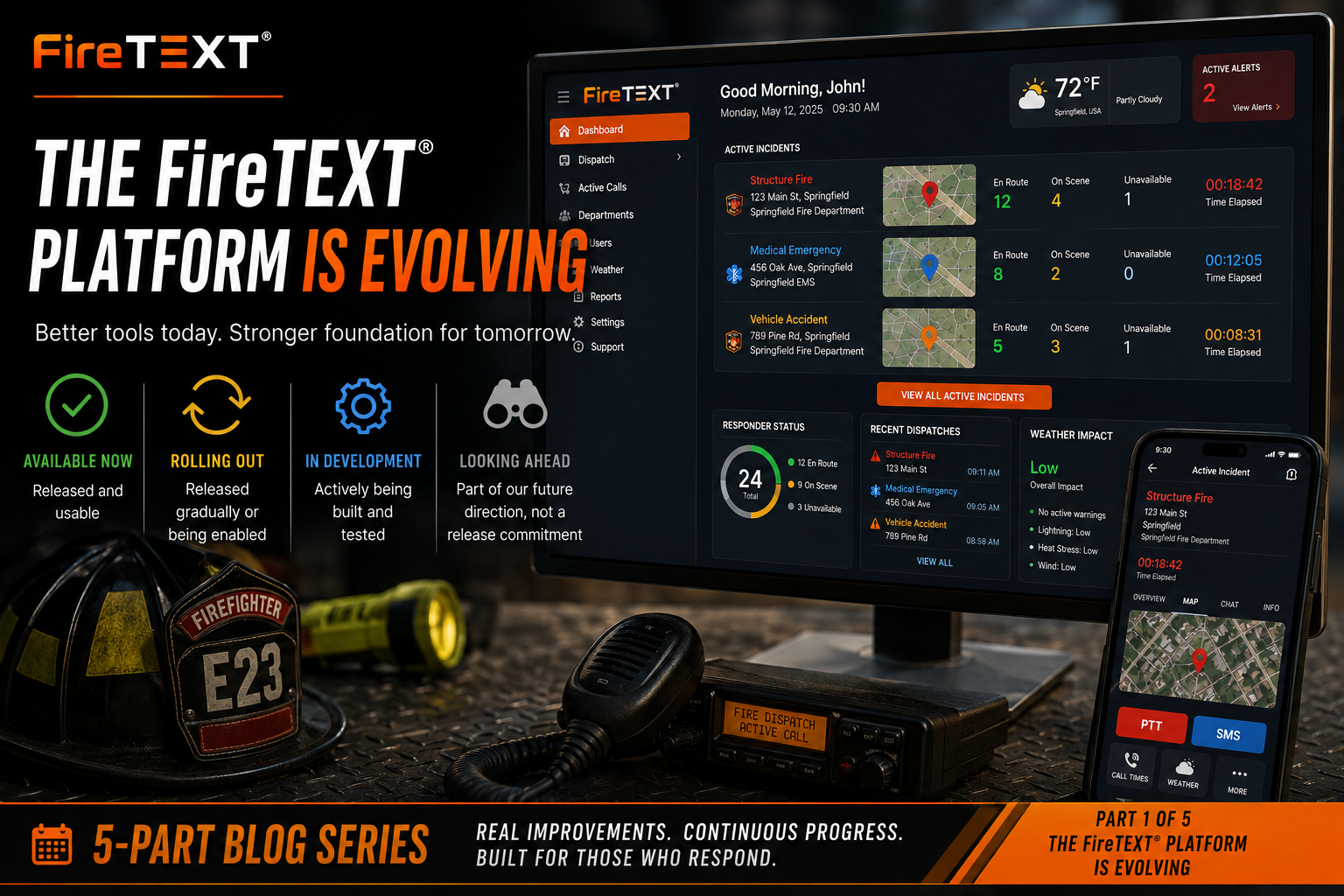
Part 1 of 5 — FireTEXT®: What’s New & What’s Next
FireTEXT® is continuing to grow into a more complete emergency communications and operations platform.
Over the past several months, we have released improvements across the dashboard, dispatch workflows, active-call management, account organization, department administration, user support, weather awareness, radio monitoring, and notification reliability.
This is not one finished “next-generation” launch. It is an ongoing evolution.
Some improvements are already available. Others are still being refined or enabled across the platform. Additional capabilities remain actively in development or part of our longer-term direction.
Throughout this series, we will continue using clear status labels:
- 🟢 Available Now — Released and usable
- 🟡 Rolling Out — Released gradually or still being enabled
- 🔵 In Development — Actively being designed, built, or tested
- ⚪ Looking Ahead — Part of our future direction, not a release commitment
Today, we are looking at the broader FireTEXT® platform and the foundation being built for what comes next.
More Than a Visual Redesign
A new interface can make software look better, but appearance alone does not make a system more useful.
The recent FireTEXT® work has focused on improving how dispatchers, responders, department administrators, and support personnel move through the platform.
That includes reducing unnecessary steps, making important information easier to find, improving operational visibility, and strengthening the systems working behind the scenes.
The goal is not to change FireTEXT® simply for the sake of change.
The goal is to help departments:
- Send information faster
- Understand active incidents more clearly
- Manage users and departments more efficiently
- Identify communication problems sooner
- Access better weather and operational information
- Maintain stronger records and accountability
- Prepare for future services without disrupting existing responder workflows
A More Operational Dashboard
🟢 Available Now
The FireTEXT® dashboard has evolved from a basic landing page into a more active operations workspace.
Recent improvements include:
- A personalized greeting
- Clearer department cards
- Improved recent-dispatch cards
- Live responder counts
- Weather information
- Active alert visibility
- Better navigation
- Department shortcuts
- Full-screen operation
- Improved map behavior
- Faster access to settings and support tools
Recent dispatch cards can now display more useful information without requiring users to open every incident individually.
Depending on the call and department configuration, users may see:
- Department name
- Incident type
- Incident address
- Map preview
- Responders en route
- Responders on scene
- Responders unavailable
- Current call status
- Active time
The dashboard is designed to help users understand what is happening across their departments at a glance.
Improved Navigation
🟢 Available Now
The left-side navigation has been reorganized and visually improved.
Updates include:
- FireTEXT® branding in the navigation header
- Current date and time
- Clear active-page highlighting
- Better icon visibility
- Tooltips when the menu is collapsed
- A compact icon rail for wider work areas
- Faster access to frequently used sections
When an account workspace is opened, the navigation can reduce to a narrow icon rail so more screen space is available for account information.
Users can still manually control the navigation size, and their choice takes priority.
The goal is simple: provide more workspace without hiding essential navigation.
A Better Active-Call Experience
🟢 Available Now
The active-call screen has been redesigned as a more complete incident workspace.
Instead of treating the call as a simple message, the updated view brings together operational information in one place.
The layout can include:
- A map that remains visible
- Incident overview
- Responder chat
- Front-door imagery
- Previous incident history
- Attachments
- Map layers
- Audio
- Responders
- Weather information
- Call times
- Incident actions
Large action tiles make commonly used tools easier to locate.
These actions may include:
- Push-to-Talk
- SMS
- Call Times
- Weather
- Edit
- Mark Inactive
- Radio Stream
- Additional call tools
The active-call timer is also clearly labeled and can be used to open detailed call-time information.
Better Incident Maps
🟢 Available Now
The active-call map supports multiple visual styles and operational layers.
Map styles may include:
- Street
- Satellite
- Hybrid
- Dark
- Terrain
Available layers may include:
- Fire stations
- Hydrants
- AEDs
- Tornado sirens
- Evacuation routes
- Hazard information
- Approved resident profiles
- Approved business profiles
Map pins have also been corrected so they remain properly attached to their geographic locations during zooming and panning.
This may seem like a small improvement, but a drifting incident pin can create confusion during an active response. Accurate map behavior matters.
Front-Door and Property Awareness
🟢 Available Now
Street-level and satellite imagery can be displayed directly within the active-call experience.
This allows dispatchers and responders to review:
- Driveway access
- Building placement
- Entrance locations
- Road approach
- Surrounding structures
- Property layout
The goal is to reduce the need to leave the call screen or open unrelated applications while reviewing the incident.
Where available and authorized, verified resident and business safety profiles can also provide additional context during an active dispatch.
Sensitive information remains permission-controlled and must never be treated as general public information.
Previous Incident History
🟢 Available Now
The History section can show previous incidents associated with the same address or a nearby location.
This can help departments recognize:
- Repeat alarm locations
- Access difficulties
- Recurring medical calls
- Previous structure incidents
- Location-specific concerns
- Earlier operational notes
Historical information should support awareness, but it should never replace current size-up or verified incident information.
Better Account Organization
🟢 Available Now
FireTEXT® customer accounts now receive permanent account numbers.
Responder accounts use the FT-1001 series.
These numbers help with:
- Customer identification
- Support
- Billing
- Account searches
- Department assignment
- Parent and child account relationships
- Internal organization
A separate CM series is reserved for future Community accounts.
Account numbers are designed to remain permanent and provide a consistent way to identify each customer relationship.
Permanent Department Numbers
🟢 Available Now
Every department can now receive a permanent FireTEXT® department number in the D-10001 series.
This is especially useful for organizations that do not have a traditional fire department identification number, including:
- Sheriff’s offices
- Communications centers
- Emergency management agencies
- Animal control
- Support organizations
- Out-of-state agencies
- Other public-service units
The FireTEXT® department number remains with the department even if it is moved between customer accounts.
FDID is also now truly optional when creating a department, while still being validated when one is provided.
Accounts Now Open as Real Workspaces
🟢 Available Now
Account information no longer has to operate primarily through a popup.
Accounts now open as full pages with:
- Direct URLs
- Browser Back support
- Browser Forward support
- Reliable refresh behavior
- Better workspace width
- Parent-account navigation
- Child-account navigation
- Direct department links
This makes the account console feel more like a true working area rather than a temporary overlay.
It also allows support and administrative staff to share a direct link to the account they are reviewing.
Better Account Assignment
🟢 Available Now
Department account assignment has also been improved.
The account picker now supports:
- Search
- Recently used accounts
- County-based suggestions
- State and county context
- Department counts
- Cleaner account names
- One-step account creation
- Automatic department assignment
- Exclusion of archived accounts
When a department does not yet belong to an account, the picker is shown immediately instead of being hidden behind another action.
Attaching the first department to an unnumbered account also causes the account number to be assigned automatically.
This helps prevent active customer accounts from existing without a permanent FireTEXT® identifier.
Department Settings Are Easier to Navigate
🟢 Available Now
Department settings have been reorganized into clearer sections and cards.
Recent improvements include:
- Collapsible navigation
- More logical feature grouping
- Improved light- and dark-theme support
- Department logo upload
- Department color selection
- Agency information
- Better account information
- Radio and FirePITCH® grouping
- Reports
- Call history
- Audit information
- User management
- Integration settings
The former Billing tab has also become the Account tab.
Billing, subscriptions, invoices, and payment methods are managed at the account level, while the department view shows the account relationship and provides links to the appropriate workspace.
Better User Management
🟢 Available Now
User administration has received several improvements.
These include:
- Color-coded user roles
- Improved account overview
- Last-login information
- Web and mobile session counts
- Force Log Out
- Notification delivery status
- Secondary contact methods
- Verified additional phone numbers and email addresses
- Title or rank
- Unit number
- CSV user export
- Better duplicate-account prevention
When adding a user, FireTEXT® can check whether the email address or phone number is already registered.
When an existing account is found, the workflow changes from creating a duplicate user to sending a department invitation.
This helps prevent one person from accidentally ending up with multiple FireTEXT® accounts.
User Export
🟢 Available Now
Department administrators can export their user or dispatcher roster as a CSV file.
The export may include:
- Name
- Phone
- Role
- Join date
- Account status
The export also respects the active search filter.
This provides departments with a practical way to review and maintain their rosters outside the console.
Better Support Tools
Several tools have been added to help diagnose account and device issues more quickly.
Test Push Notifications
🟢 Available Now
Authorized FireTEXT® administrators can send a test or custom push notification to a user’s registered devices.
The test may use:
- The user’s selected app alert tone
- The device’s default notification sound
This helps separate different types of problems.
For example:
- Did the push reach the device?
- Did the user’s selected dispatch sound play?
- Is the device registered?
- Is the problem related to the tone setting or notification delivery?
Per-device delivery results can provide useful troubleshooting information.
Secure Password-Reset Links
🟢 Available Now
Authorized administrators can generate a secure, single-use password-reset link for a user.
The link:
- Uses a random token
- Expires after 24 hours
- Works once
- Does not expose stored credentials
This can help when normal password-reset emails are delayed, filtered, or not reaching the user.
Screenshot Unlock Codes
🟢 Available Now
The FireTEXT® mobile app blocks screenshots to protect sensitive information.
That privacy protection can make troubleshooting difficult when users need to show support what they are seeing.
Authorized administrators can now generate a temporary Screenshot Unlock Code.
The code can permit screenshots for a limited period, such as:
- 15 minutes
- 30 minutes
- 60 minutes
The code is single-use, expires quickly if it is not redeemed, and is recorded for audit purposes.
The app then automatically returns to screenshot protection.
Stronger Notification Visibility
🟢 Available Now
FireTEXT® continues to improve how notification delivery is recorded and diagnosed.
Recent work includes:
- Better SMS status accuracy
- Real-time status updates
- More delivery states
- Error details
- Retry controls
- Secondary contact support
- Better handling of opt-outs
- Test push notifications
- Per-device results
Outbound SMS messages should no longer remain incorrectly stuck as “Queued” when the carrier has already returned a later delivery status.
A reconciliation process can also compare pending records against the provider and update messages that did not receive a properly matched callback.
These changes improve both customer visibility and support troubleshooting.
Improved CAD Routing
🟢 Available Now
Inbound CAD emails are now matched more reliably using the address to which the message was actually delivered.
This matters when messages are:
- Forwarded
- Relayed
- Routed through another mailbox
- Delivered using a parse address not clearly represented in the visible To header
FireTEXT® now checks the delivery address across multiple email envelope and header sources.
This helps ensure that CAD emails reach the correct department even when the visible email headers do not tell the full routing story.
Safer Updates
🟢 Available Now
When a new console version is ready, FireTEXT® can display an update notice instead of automatically refreshing the page.
The notice includes the available version and allows the user to choose when to load it.
This is especially important in dispatch environments.
A live operations screen should not reload in the middle of an active call simply because a new software build became available.
The user remains in control of when the update is applied.
Weather Throughout the Platform
🟢 Available Now
Weather information is increasingly being integrated into operational workflows.
Weather can appear:
- On the dashboard
- In the dispatch workflow
- Inside active calls
- On station displays
- Within the Weather Command Center
- On statewide weather-alert pages
FireTEXT® can now distinguish between:
- An alert covering the incident location
- An alert active elsewhere in the incident’s county
That difference matters.
A tornado warning directly over the scene is not the same as a warning in another part of the county, but both may still be operationally relevant.
The platform is being designed to communicate that distinction clearly.
Wednesday’s article will provide a much deeper look at weather intelligence.
Reliability Work Behind the Scenes
🟢 Available Now and Ongoing
Some of the most important platform improvements are not highly visible.
Recent work has included:
- CAD routing fixes
- SMS status reconciliation
- Radio stream recovery
- Authentication safeguards
- Error reporting
- Super-administrator alerts
- Audit logging
- Privacy enforcement
- Map corrections
- Session controls
- Secure links
- Safer uploads
- Better deployment behavior
- Improved device diagnostics
These changes do not always produce a dramatic new screen.
They do, however, make FireTEXT® more dependable, easier to support, and safer to operate.
Reliability work is never truly finished. It remains an ongoing responsibility.
What Is Still Rolling Out
🟡 Rolling Out
Some platform features may be available only to certain users, departments, mobile versions, service configurations, or administrative roles.
Examples may include:
- New dashboard experiences
- Critical Alerts on supported mobile versions
- Expanded Weather Command Center tools
- Updated station-display features
- Advanced account workflows
- Additional radio visibility
- New support capabilities
- Selected FirePITCH® monitoring tools
Availability can depend on:
- Department permissions
- Mobile app version
- Service enrollment
- Feature flags
- Account configuration
- Hardware compatibility
- User role
- Staged deployment
A feature appearing in this series does not automatically mean every department has access to it today.
What Is in Development
🔵 In Development
FireTEXT® continues to work on additional improvements across the platform.
Current development areas include:
- More refined dispatch workflows
- Expanded responder-status tools
- Improved mobile experiences
- Additional weather capabilities
- Stronger radio and FirePITCH® oversight
- Better analytics
- Additional integrations
- More community-facing functionality
- Improved cross-platform consistency
These areas may change during design, testing, and field validation.
No feature should be treated as generally available until it has been released and clearly identified as such.
Looking Ahead
⚪ Looking Ahead
The platform foundation being built today creates opportunities for future services such as:
- FireTEXT® Community
- MyFireDepartment.net
- Verified department pages
- Community Profiles
- Public alerts and announcements
- Department events
- Volunteer recruitment
- Public resources
- Community weather
- Schools, churches, cities, counties, and utilities
- Expanded Push-to-Talk
- New integrations
- Broader communication tools
These concepts will be discussed in more detail later in the series.
The responder platform remains the priority.
Future community services must be separated from responder operations through appropriate permissions, interfaces, and data protections.
Built From Real Feedback
Many of these improvements began with real department experiences.
They came from:
- Customer support tickets
- Missed-page investigations
- Device troubleshooting
- Department suggestions
- Dispatcher feedback
- Severe-weather events
- Radio-stream interruptions
- Billing and account-management needs
- User-access questions
- Field reports
FireTEXT® is not being developed as a generic messaging product.
It is being shaped around the needs of fire departments, dispatch centers, emergency-service organizations, and the responders who depend on timely information.
That work is ongoing.
What Comes Next
Today’s article provided the broader view of how the FireTEXT® platform is evolving.
Tomorrow, we will focus specifically on dispatching.
We will look at:
- Quick Dispatch
- Fire, EMS, and All Call shortcuts
- Push and SMS channel selection
- Responder acknowledgment
- En Route, On Scene, and Not Available responses
- Operations Map
- Active incidents
- Favorite agencies
- Full-screen mode
- Attachments
- Call times
- CAD routing
- The active-call command experience
Coming Tuesday
Dispatch Faster: What’s New and What’s Coming Next
FireTEXT® release history supports the platform improvements described here, including the redesigned dashboard and active-call experience, permanent account and department numbers, improved user and support tools, account workspaces, safer update behavior, CAD routing changes, SMS status improvements, weather integration, and ongoing platform reliability work.