
Dispatch Faster: What's New & What's Coming Next
Dispatch Faster: What's New & What's Coming Next
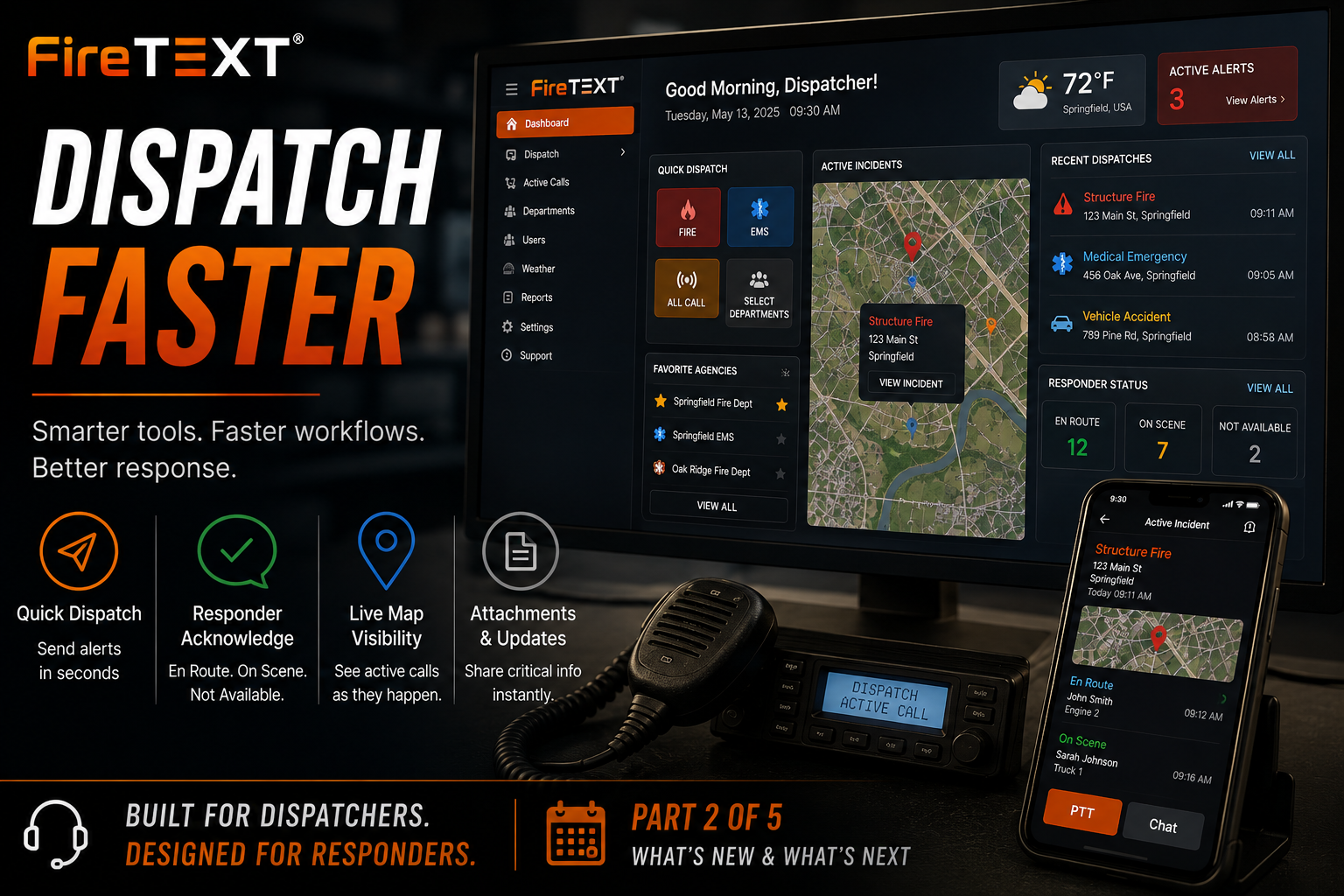
Part 2 of 5 — FireTEXT®: What's New & What's Next
When an emergency call comes in, every second matters.
Dispatchers have only moments to gather information, notify responders, monitor acknowledgements, and manage an incident as it unfolds. The software they rely on shouldn't slow them down—it should help them work faster, stay informed, and maintain situational awareness from the first alert until the last unit clears the scene.
That's exactly what has been driving many of the recent improvements across FireTEXT®.
Today's article focuses on the dispatch experience and how we're continuing to improve call creation, notification delivery, responder awareness, and incident management.
As with every article in this series, we'll clearly identify the status of each feature.
- 🟢 Available Now — Released and usable
- 🟡 Rolling Out — Released gradually or still being enabled
- 🔵 In Development — Actively being built and tested
- ⚪ Looking Ahead — Part of our long-term vision
A Faster Dispatch Experience
🟢 Available Now
One of the biggest improvements to FireTEXT® is the redesigned Dispatch Center.
Rather than navigating through multiple windows, dispatchers can now manage much of their workflow from a single operational dashboard.
The goal is simple:
Spend less time navigating.
Spend more time dispatching.
The updated workspace brings together:
- Quick Dispatch
- Active Incidents
- Operations Map
- Recent Dispatches
- Favorite Agencies
- Weather Information
- Responder Status
- Notification Controls
Everything is organized to reduce clicks while keeping the most important information visible.
Quick Dispatch
🟢 Available Now
Quick Dispatch allows dispatchers to begin sending an alert immediately from the dashboard.
Common dispatch types can be selected with a single click, including:
- Fire
- EMS
- All Call
- Individual Departments
- Favorite Agencies
Instead of rebuilding recipient lists every time, frequently dispatched agencies are always within reach.
This is especially valuable during high-call volume or rapidly changing incidents.
Choose How the Alert Is Delivered
🟢 Available Now
Not every incident is the same.
FireTEXT® allows dispatchers to choose how a notification is delivered.
Dispatches can be sent by:
- Push Notification
- SMS Text Message
- Push + SMS Together
This flexibility helps departments match delivery methods to their operational needs.
Know Who Is Responding
🟢 Available Now
Sending the alert is only the beginning.
FireTEXT® now makes it easier to understand what happens after the notification is delivered.
When Request Acknowledgement is enabled, responders can quickly report their status.
Available responses include:
- En Route
- On Scene
- Not Available
Instead of wondering whether enough personnel are responding, dispatchers and officers gain immediate visibility into available resources.
As responses come in, department leadership can better understand staffing during an active incident.
Operations Map
🟢 Available Now
The Operations Map brings incidents to life visually.
Instead of scrolling through a list of calls, dispatchers can immediately see where active incidents are occurring.
Each incident pin can provide quick access to:
- Incident details
- Address
- Department
- Status
- Active responders
The map is designed to complement the dispatch workflow—not replace it.
Active Incident Management
🟢 Available Now
The Active Call screen has evolved into a complete operational workspace.
Dispatchers and responders can access important information without switching between multiple applications.
The workspace may include:
- Incident Overview
- Live Map
- Weather
- Responder Status
- Attachments
- Chat
- Audio
- Call Times
- Previous Incident History
- Front Door Imagery
The goal is to keep operational information organized around the incident itself.
Better Attachments
🟢 Available Now
Critical information often includes more than text.
Dispatchers can include:
- Photos
- Documents
- Maps
- Supporting information
Attachments are managed directly within the incident and can be synchronized to responders as needed.
Departments no longer have to rely on separate messaging systems to share important files.
Improved CAD Reliability
🟢 Available Now
Behind the scenes, we've continued improving how FireTEXT® processes incoming CAD messages.
Instead of relying solely on the visible email recipient, FireTEXT® now examines the actual delivery address used during message routing.
This improves reliability when messages are:
- Forwarded
- Routed through another mailbox
- Delivered to a parse address
- Processed by intermediate mail servers
It's a technical improvement most users will never notice—but reliability improvements like this are some of the most important work we do.
Better SMS Visibility
🟢 Available Now
We've also improved SMS delivery tracking.
Departments now have better visibility into whether messages were:
- Sent
- Delivered
- Undelivered
- Failed
- Still Pending
Additional reconciliation helps ensure message status remains accurate even when carrier callbacks are delayed or incomplete.
This gives departments more confidence when reviewing notification history.
Designed Around Real Dispatch Workflows
🟢 Available Now
Many dispatch improvements came directly from customer feedback.
Dispatchers told us they wanted:
- Fewer clicks
- Faster recipient selection
- Better incident visibility
- Easier responder tracking
- Stronger notification confidence
- Cleaner active-call screens
Every improvement is intended to make dispatching feel more natural without disrupting existing workflows.
What's Still Rolling Out
🟡 Rolling Out
Some dispatch enhancements continue to be introduced across the platform.
Depending on department configuration, services, permissions, and app version, you may begin seeing:
- Expanded dashboard capabilities
- Additional responder-status tools
- Enhanced station displays
- Improved active-call workflows
- New notification controls
- Additional administrative options
Availability may vary by department while these features continue to roll out.
What We're Building
🔵 In Development
Development continues in several areas designed to make dispatching even more efficient.
Current areas of focus include:
- Additional CAD integrations
- Expanded incident collaboration
- Improved responder accountability
- More flexible dispatch workflows
- Better operational reporting
- Smarter dispatch automation
- Additional acknowledgement options
- Enhanced multi-agency coordination
As always, features in development may change as we continue testing and gathering customer feedback.
Looking Ahead
⚪ Looking Ahead
Dispatch is only one part of emergency communications.
Future platform improvements will continue expanding beyond alert delivery to include stronger operational awareness, better weather intelligence, Community Profiles, responder collaboration, and additional tools that support departments before, during, and after an incident.
Every new capability will continue following the same principle:
Make communication faster.
Make information clearer.
Never complicate the dispatcher's job.
Built for Those Who Dispatch
Every feature we build begins with one question:
Will this help someone do their job more effectively during an emergency?
If the answer is no, it doesn't belong in FireTEXT®.
Dispatchers are the first link in every emergency response.
The work they do deserves tools that are dependable, efficient, and built around real-world operations—not unnecessary complexity.
That's exactly where we're headed.
Coming Tomorrow
Weather That Works for Responders
Tomorrow, we'll look at one of the fastest-growing areas of FireTEXT®.
We'll explore how weather is becoming operational intelligence—not just a forecast.
Topics include:
- Weather Impact Scores
- Operational Briefings
- Lightning Awareness
- Crew Heat Stress
- Flood Monitoring
- Incident Weather
- Statewide Alerts
- Future Weather Command Center enhancements
Continue the Series
- Sunday: FireTEXT®: What's New & What's Next
- Monday: The FireTEXT® Platform Is Evolving
- Tuesday: Dispatch Faster: What's New & What's Coming Next
- Wednesday: Weather That Works for Responders
- Thursday: Inside FirePITCH®
- Friday: Connecting Departments and Communities